YouTube Shorts has become one of the fastest ways to grow a channel and reach millions of viewers. However, many creators are still uploading room transformation timelapse videos, and the competition in that niche has become extremely high. Because of this, many new channels struggle to get views.
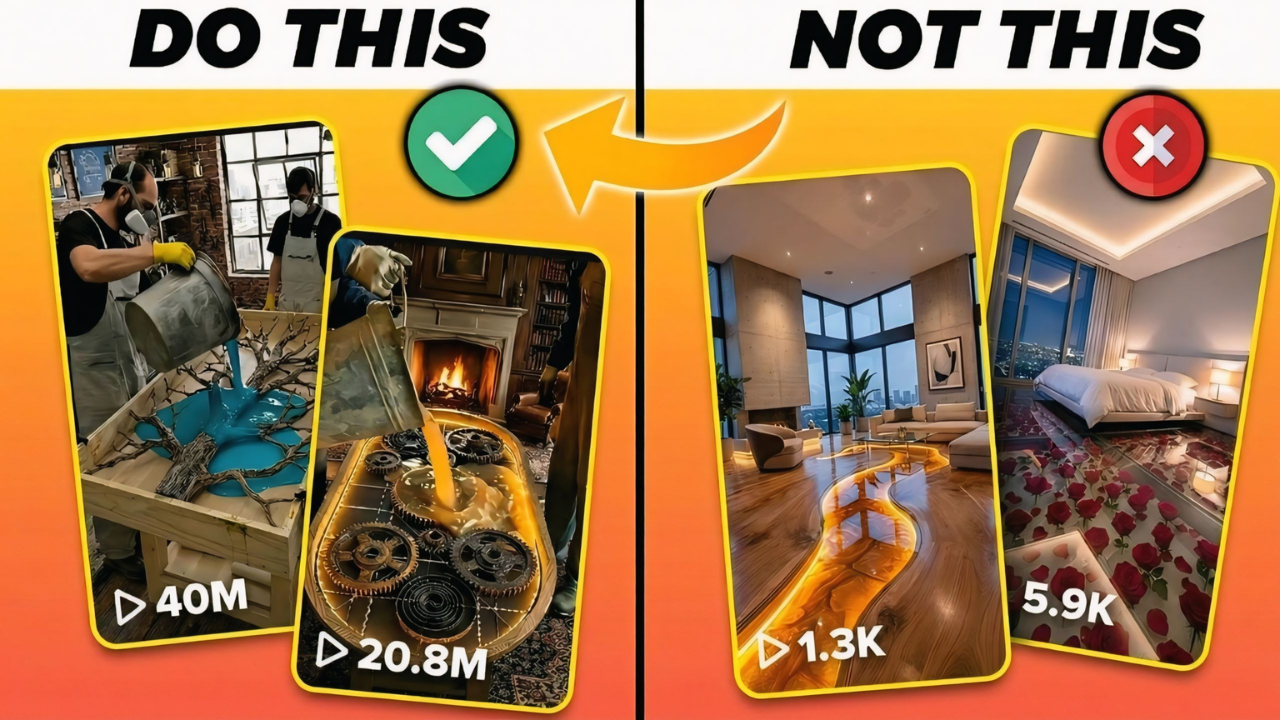
But recently, I discovered a new YouTube Shorts niche with very low competition that is generating millions of views. Many channels are uploading simple table renovation and design videos and getting incredible results.
For example, one channel uploaded a table design video that reached 33 million views. Another similar video reached 24 million views, and another crossed 52 million views. This shows that the niche has massive viral potential.
And the interesting part? Many of these videos are created using AI tools.
In this guide, I will show you step-by-step how to create these viral videos using AI tools, even if you are a beginner.
Step 1: Generate Video Ideas Using ChatGPT
The first thing you need is a good video idea.
To make this easier, you can use a prompt that generates topic ideas automatically. I have prepared prompts that you can use. These prompts are available in a Google Document link .
prompt linkWhen you open the document, you will find two prompts.
First, copy the first prompt.
Then open ChatGPT and paste the prompt. After clicking generate, ChatGPT will give you 10 topic ideas related to table renovation and design.
You can choose any topic from the list. If you don’t like the ideas, you can regenerate the prompt to get new topics.
Step 2: Generate Image and Video Prompts

After selecting your topic idea, go back to the Google Document and copy the second prompt.
Paste this prompt into ChatGPT.
Inside the prompt, you will see a section where the video topic is written in brackets. Replace that text with the topic you selected earlier.
After clicking generate, ChatGPT will automatically create:
- Image prompts
- Video prompts
These prompts will be used to create visuals for your video.
Step 3: Generate AI Images
Now it’s time to create images.
Copy the first image prompt generated by ChatGPT.
Then go to an AI image generator. In this tutorial, we are using Pippit AI.
Open the Pippit AI website and click on the Image generator option.
Paste your prompt into the prompt box. Then choose your preferred image model and set the aspect ratio to 9:16, which is perfect for YouTube Shorts.
Click the Generate button, and your AI image will be created.
Repeat this process for all image prompts.
Step 4: Download the Images
Once all images are generated, download them to your device.
Click on each image and use the download option in the top corner.
Save all images on your device because we will use them in the next step.
Step 5: Convert Images Into Video Clips
Now we will convert these images into videos.
For this step, we will use Flow AI.
Open the Flow AI website and click New Project.
Then click the plus icon and upload the first image.
Go to Settings, select Video mode, and set the aspect ratio to Portrait.
Now go back to ChatGPT and copy the video prompt for that image.
Paste the prompt into Flow AI and click Generate.
Flow AI will convert your image into a short video clip.
Repeat this process for all images until all clips are ready.
After that, download all video clips to your device.
Step 6: Edit the Video Using CapCut
Now it’s time to edit your video.
Open CapCut and click Import.
Upload all the video clips you generated using Flow AI.
Drag the first clip to the timeline. If there is a watermark visible, slightly zoom in on the clip so the watermark disappears.
Then place the second clip next to the first one.
Continue adding all clips to the timeline in order.
If you want to make the video smoother, you can add transitions between clips.
CapCut provides easy transitions that you can apply with a single click.
Once everything is ready, click the Export button to save your final video.
Final Result
Congratulations! You have now created a viral-style YouTube Shorts video using AI tools.
This method is powerful because:
- It requires no filming
- It works well for faceless YouTube channels
- It can generate millions of views in a low-competition niche
If you follow these steps correctly, you can build a successful YouTube Shorts channel and grow quickly.