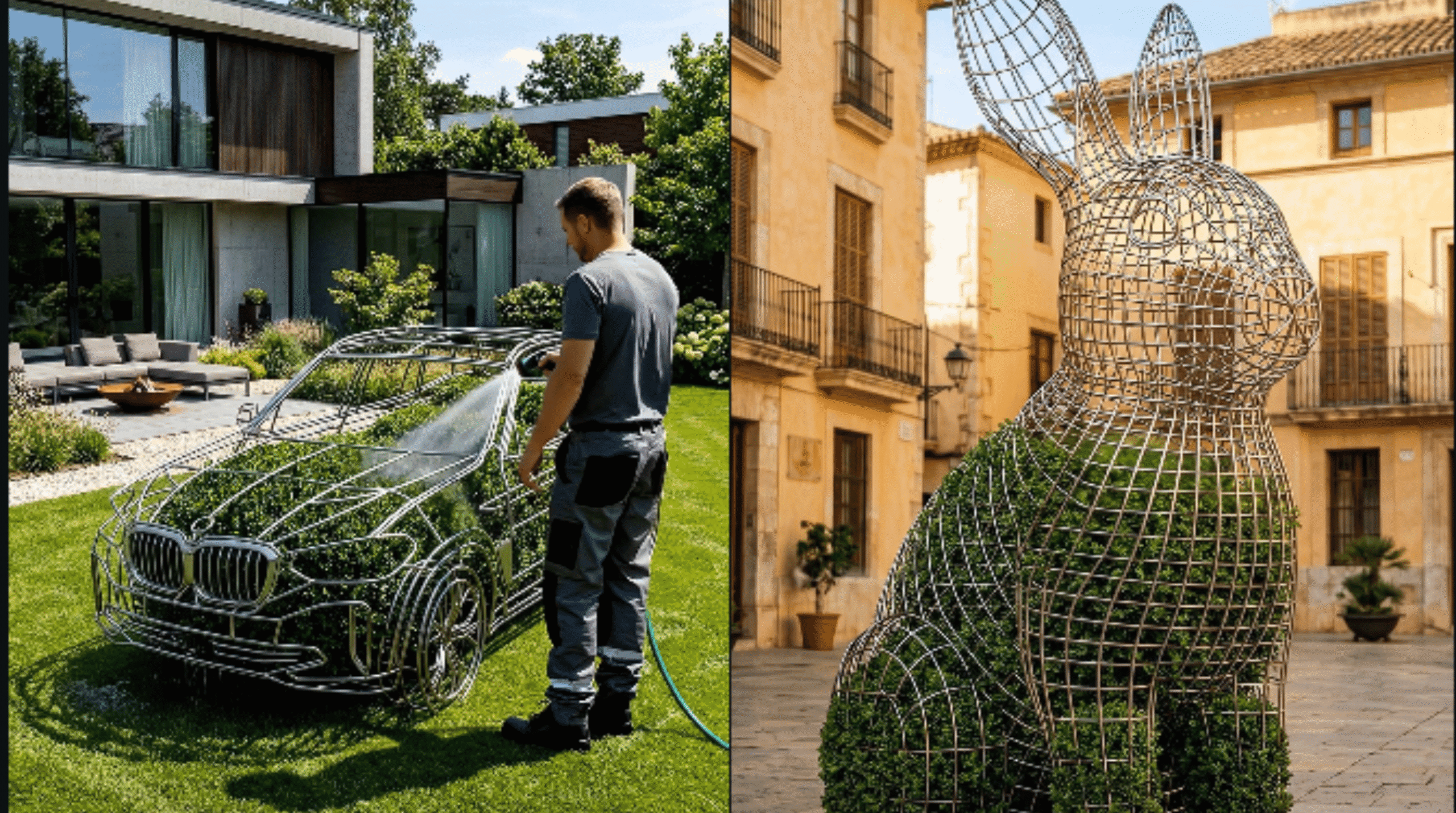
Wait… if I told you people are getting 200 million views from videos of plants shaped like airplanes, you’d probably think it’s a joke.
But it’s not.
In fact, there’s an entire content style—simple, oddly satisfying, and massively viral—that’s quietly dominating platforms like Instagram. And the crazy part? Almost nobody is tapping into this niche on YouTube Shorts yet.
That means one thing: opportunity.
In this guide, I’ll walk you through the exact system behind these viral videos—and how you can recreate them using 100% free AI tools. No paid tricks. No hidden hacks. Just a simple, repeatable process.
Why This Works (And Why Nobody Talks About It)
Some creators are pulling:
- 210+ million views on a single video
- Multiple uploads with millions of views
- Consistent viral performance with simple content
And yet… the process behind it is surprisingly easy.
These videos aren’t complex edits or high-budget productions. Instead, they rely on:
- Smart prompting
- Visual progression
- AI-generated motion
Once you understand the system, you’ll start seeing it everywhere.
Step 1: The Most Important Part — The Prompt
Before anything else, you need to understand this:
If your prompt is weak, your video is dead.
This is where most people fail—not editing, not tools, but the idea itself.
You’ll start with a base prompt (from your doc), and inside it, you’ll find a word in brackets like:
“Elephant”
This single word defines your entire video.
What You Should Do:
- Replace it with your idea (e.g., Car, Airplane, Dragon)
- Don’t overthink or tweak everything
- Just change that one word and copy the full prompt
👉 Small changes here can completely affect how viral your video becomes.

Step 2: Generate Prompts Using ChatGPT
Now take your edited prompt and paste it into ChatGPT.
But don’t just type randomly—follow this path:
- Go to Explore GPTs
- Search for “Time Lab Restoration”
- Open it and click Start Chat
- Paste your prompt and generate
Within seconds, you’ll get:
- An image prompt
- A video prompt
These two outputs are the backbone of the entire process.
Step 3: Generate Your First Image
Now it’s time to turn text into visuals.
Tool: Pippit AI (Free)
- Go to the image generator
- Paste your first image prompt
- Set aspect ratio to 9:16 (portrait)
- Click generate
This image becomes the first frame of your video.
Step 4: Build Visual Progression (The Secret Sauce)
Here’s where most people mess up—they stop at one image.
But viral content needs progression.
What to do:
- Click “Add to Chat” under your first image
- Copy the second image prompt from ChatGPT
- Paste it while keeping the first image as reference
- Generate again
Repeat this process for:
- Third image
- Fourth image
Now you’ll have 4 connected images that evolve step by step.
👉 This creates the illusion of motion—even before animation.
Step 5: Fix Weak Ideas (If Needed)
Not every concept works.
For example:
- “Car” might look boring
- “Airplane” might look unique and eye-catching
If your result feels average:
- Go back
- Change just one word
- Regenerate everything
Sometimes a tiny tweak makes a massive difference.
Free AI Video Tool link
Step 6: Turn Images into Video
Now comes the final transformation.
Use a Free AI Video Tool
- Open the video generator
- Click Start New Video
- Set aspect ratio to portrait
- Choose model: VEO 3.1
Then:
For each image:
- Select Animate Image
- Upload your image
- Paste the corresponding video prompt
- Generate
- Insert into timeline
Repeat for all images.
Step 7: Export Your Viral Video
Once all clips are added:
- Click Share
- Download your final video
That’s it.
You’ve just created a viral-style AI video using only free tools.
Final Thoughts
This entire system comes down to three things:
- Strong prompt
- Visual progression
- Smooth animation
Miss even one of these, and your results will fall flat.
But if you follow the process exactly, you can create content that:
- Looks unique
- Feels satisfying
- Has real viral potential
And the best part?
You don’t need money, expensive software, or advanced skills.
Just the right system.